A4 vs Letter Size: Which Should You Choose for PDF Conversion?
Quick Answer
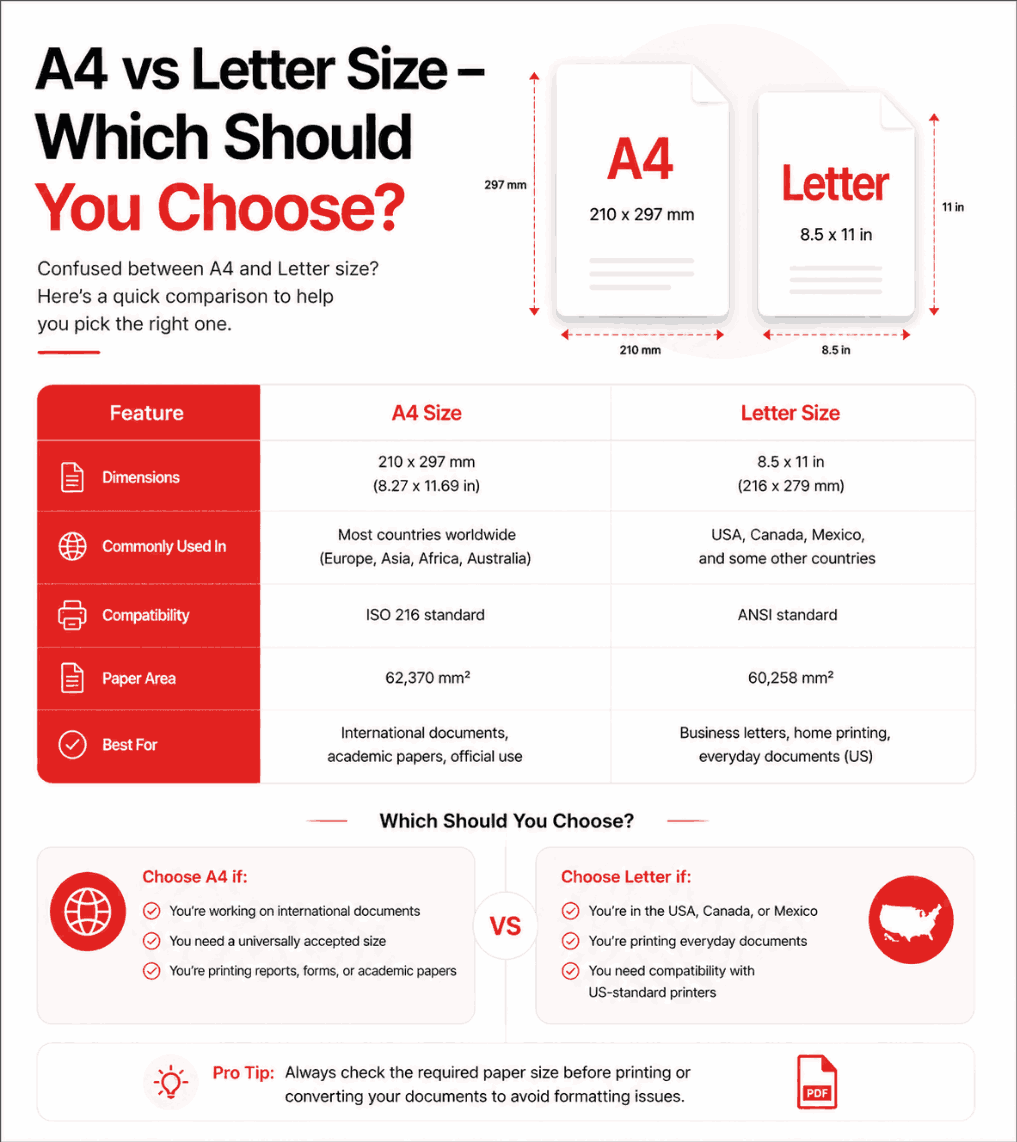
If you reside in the United States, Canada, or Mexico, choose US Letter (8.5 x 11 inches). If you reside anywhere else in the world, choose A4 (8.27 x 11.69 inches). Selecting the region-appropriate size ensures your documents print flawlessly without awkward scaling or cut-off margins.
Summary
Navigating the digital transition often requires understanding legacy physical standards. The debate between A4 and US Letter sizes remains a significant point of confusion when finalizing digital documents. This guide provides a factual breakdown of the exact dimensional differences, historical context, and professional recommendations to ensure your documents maintain formatting integrity across borders.
Introduction
When converting an Image to PDF, one of the final configuration choices is selecting a page size. While it may seem like a minor detail for a purely digital file, the page size fundamentally dictates how the document will behave when it transitions back into the physical world via a printer.
Choosing the wrong format can result in mangled formatting, severed headers, and an unprofessional presentation. To prevent this, one must understand the technical specifications of the world's two dominant paper standards.
The Technical Differences
The distinction between the two formats is rooted in two different systems of measurement: the Metric system (ISO 216) and the Imperial system.
| Feature | A4 Standard | US Letter Standard |
|---|---|---|
| Dimensions (mm) | 210 x 297 mm | 215.9 x 279.4 mm |
| Dimensions (inches) | 8.27 x 11.69 inches | 8.5 x 11.0 inches |
| Aspect Ratio | 1:1.414 (√2) | 1:1.294 |
| Primary Regions | Europe, Asia, Oceania, Africa, South America | USA, Canada, Mexico, Philippines, Chile |
As the data illustrates, A4 is slightly taller and narrower, whereas US Letter is slightly shorter and wider. The A4 format is built on the mathematical ratio of the square root of 2, meaning that if you fold an A4 paper in half, the resulting A5 paper retains the exact same aspect ratio. The US Letter size lacks this mathematical scaling property.
When to Use A4
Ideal Scenarios for A4
- Submitting documents to any government or academic institution outside of North America.
- Collaborating with international teams in Europe, Asia, or Australia.
- Formatting academic papers utilizing ISO standard layouts.
If your audience resides outside the North American sphere, A4 is mandatory. Sending a Letter-sized PDF to a European office will inevitably cause their printers to pause and display a "Paper Mismatch" error, disrupting their workflow.
When to Use US Letter
Ideal Scenarios for US Letter
- Filing documents with United States state or federal courts.
- Applying for jobs or universities in the USA or Canada.
- Generating invoices for North American clients.
In the United States and Canada, the printing infrastructure is hard-coded for the 8.5 x 11 inch dimension. Always use this format when dealing with entities in these countries to ensure seamless physical reproduction of your digital files.
Step-by-Step Configuration Guide
Modern conversion utilities, such as client-side JPG to PDF generators, simplify this configuration. Follow these steps to set the correct size:
- 1Determine the Destination: Identify where the recipient will physically print the document.
- 2Select the Format: Open your converter's settings and select either 'A4' or 'Letter' from the layout dropdown menu.
- 3Review the Margins: The software will map your images onto the selected canvas. Ensure critical information isn't positioned on the extreme edges.
- 4Generate the File: Initiate the compilation. The resulting metadata will lock the dimensions for accurate reproduction.
Common Mistakes
Warning: The "Fit to Page" Trap
A frequent error occurs when users print a document of one size on paper of another size without checking the "Fit to Page" or "Scale to Fit" option in the print dialog. Printing an A4 document on Letter paper at 100% scale will cut off the bottom margin.
Pro Tips for Professionals
If you are compiling a digital-only document that will likely be viewed on mobile devices and never printed (such as a PNG presentation deck), paper sizes become irrelevant. In this scenario, selecting the "Fit Image" or "Original Size" setting in your converter is optimal, as it removes white margins entirely, maximizing the screen real estate on smartphones and tablets.
Frequently Asked Questions
What is the exact size difference between A4 and US Letter?
A4 is 210 x 297 mm (8.27 x 11.69 inches) and US Letter is 215.9 x 279.4 mm (8.5 x 11 inches). A4 is slightly narrower and taller, while Letter is wider and shorter.
Will an A4 document print properly on US Letter paper?
Usually, no. If you print an A4 document on Letter paper without scaling, the top or bottom edges may be cut off because A4 is taller. Always use "Fit to Page" in your printer settings.
Which format should I use for international business?
A4 is the global standard used by 95% of the world. Unless you are specifically dealing with companies in North America, you should default to A4.
Does the paper size affect the PDF file size?
No. The physical dimensions (A4 vs Letter) do not significantly impact the megabyte size of the digital PDF. The file size is determined by the resolution and compression of the images within the document.
How do I change the page size when converting images to PDF?
Most modern conversion tools provide a dropdown menu in their settings. Simply select your desired format before clicking the convert button, and the engine will scale your images to fit the canvas.
Why are there different standards anyway?
The ISO 216 standard (A4) was developed in Europe based on the metric system and a consistent aspect ratio. The US Letter standard is based on historical imperial measurements used in early American paper manufacturing.
Conclusion
Selecting the correct page size is a crucial step in maintaining a professional appearance when your digital files are rendered physically. By aligning your format choice with the geographic location of your recipient, you eliminate technical friction and demonstrate attention to detail.
When you are ready to compile your documents, utilize client-side tools like the PDFChacha Converter to securely format your files in either A4 or US Letter instantly, right from your browser.